Trend channel
- Value
rising · 81,604 → 82,805 · width 1,690
- Upper
- Middle
- Lower
Two parallel lines on the chart. Two parallel lines you draw on the chart: the first through two points, such as two lows, the second at a distance above or below, such as through the high in between. From the first point both continue to the right, and on request to the left as well. With a Range the chain alerts you when the price leaves the channel. Example: “Price exits the range between lower and upper channel line” reports the breakout up as well as down.
What it looks like
Section titled “What it looks like”- Price (close of each candle)
- Trend channel
- middle
- points of the lower line
- Price exits the channel
Setting it in the chart
Section titled “Setting it in the chart”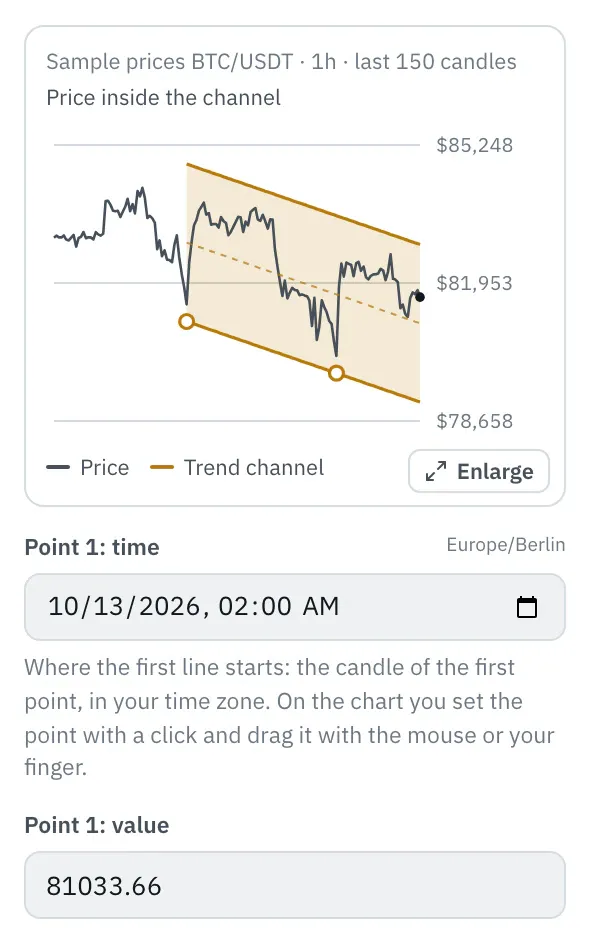
In the properties, a chart shows the last 150 candles with the channel: the first line with its points, the second parallel to it, an area in between and the middle dashed. The top line shows whether the price at the last candle is inside the channel or how far above or below it. You draw and drag it on the chart: “Enlarge” opens it, and a trend channel without points is drawn there with “Draw the channel on the chart”. You can also type time and value of the points and the offset in the fields.
More under Draw a trend channel.
Settings
Section titled “Settings”The settings appear on the right under “Properties” once you click the node on the board. Below each field you find the same explanation as here.
Point 1: time
Section titled “Point 1: time”Where the first line starts: the candle of the first point, in your time zone. On the chart you set the point with a click and drag it with the mouse or your finger.
Point 1: value
Section titled “Point 1: value”The value at the first point, usually a price like 84,120, such as a low.
Point 2: time
Section titled “Point 2: time”The candle of the second point. The first line runs through both points.
Point 2: value
Section titled “Point 2: value”The value at the second point, such as the next low. Higher than the first means the channel rises.
Offset of the second line
Section titled “Offset of the second line”How far the second line lies from the first, in the unit of the value: plus above, minus below, such as 1500 for $1,500 above the first line. On the chart you set it with the third click and drag the line by the handle on the right.
Extend
Section titled “Extend”Where the line runs beyond its points. To the right it applies from the first point, as drawn. Both ways it also runs to the left into the past: you then see where the price touched it before, and the replay and chart also count crossings before the first point.
- to the right (default): From the first point, as drawn.
- both ways: Also before the first point, back to the start of the chart.
Example
Section titled “Example”A breakout from the channel: the lower line runs through two lows, the upper one parallel through the high in between. Telegram notifies you as soon as the price leaves the channel up or down. You draw it on the chart with three clicks.
How to connect the nodes:
- Candle (Price) → Trend channel (Value)
- Candle (Price) → Range (Value)
- Trend channel (Lower) → Range (Low)
- Trend channel (Upper) → Range (High)
- Range (true/false) → Telegram (Trigger)
On the board it reads: rising · 81,604 → 82,805 · width 1,690
Chain as JSON
To try it, copy it and paste it in the editor under “Import”. Importing creates a new chain.
{ "name": "Example: Trend channel", "version": 1, "nodes": [ { "id": "c1", "type": "core.candle", "position": { "x": 40, "y": 40 }, "settings": { "pair": "BTC/USDT", "timeframe": "1h" } }, { "id": "l1", "type": "core.trendchannel", "position": { "x": 260, "y": 40 }, "settings": { "time1": "2026-10-09T01:00:00Z", "value1": 81603.52, "time2": "2026-10-11T04:00:00Z", "value2": 82804.65, "offset": 1690 } }, { "id": "g1", "type": "core.range", "position": { "x": 480, "y": 40 }, "settings": { "mode": "exits" } }, { "id": "t1", "type": "core.telegram", "position": { "x": 700, "y": 40 }, "settings": {} } ], "edges": [ { "from": "c1.close", "to": "l1.in" }, { "from": "c1.close", "to": "g1.in" }, { "from": "l1.lower", "to": "g1.lower" }, { "from": "l1.upper", "to": "g1.upper" }, { "from": "g1.out", "to": "t1.in" } ]}Inputs and outputs
Section titled “Inputs and outputs”Only matching types connect: number series to number series (round pin), signal to signal (square), message to message (diamond).
| Direction | Pin | Type | Note |
|---|---|---|---|
| Input | Value | Number series | required |
| Output | Upper | Number series | in the unit of the input |
| Output | Middle | Number series | in the unit of the input |
| Output | Lower | Number series | in the unit of the input |
Good to know
Section titled “Good to know”- In messages the values are called “upper channel line”, “channel middle”, “lower channel line”.
- Search also finds it under: trend channel, channel, parallel, draw, breakout, sideways, line.
Technical details
Section titled “Technical details”First line as with the trend line: value 1 + (value 2 − value 1) · (open time − time 1) / (time 2 − time 1), linear in time; the second lies the offset above (plus) or below (minus). Upper is the higher of the two, Lower the lower one, the middle lies exactly in between. Empty before the first point unless extended both ways, and empty without a value at the input.
- Type in the chain:
core.trendchannel· Version 1.0.0 · Category keyind - Settings in the chain:
time1(Point 1: time),value1(Point 1: value),time2(Point 2: time),value2(Point 2: value),offset(Offset of the second line),extend(Extend) - Pins in the chain: Input
in· Outputupper,middle,lower - Reference tests in the manifest: 4 (with fixed price data: 500 candles of 1h)
- How a node is built
Version 2026.10.25.16 · Changelog