Percent rank
- Value
168 candles · below 10
- Rank
- low
- high
Rank among the last values, 0–100. Tells you where the current value stands among the values of the candles before: 90 means it is higher than or equal to 90 % of them, 0 means it was never that low there. This lets you compare values whose usual size differs from coin to coin, such as volume, volatility or the distance to an average, without finding a separate number for each coin. Example: Historical volatility 20 followed by Percent rank 365 on daily candles below 10 reports when the swings are as low as on hardly any day in the past year.
What it looks like
Section titled “What it looks like”- Price (close of each candle)
- Rank 100
- below 20 (“low”) and above 80 (“high”)
Setting it in the chart
Section titled “Setting it in the chart”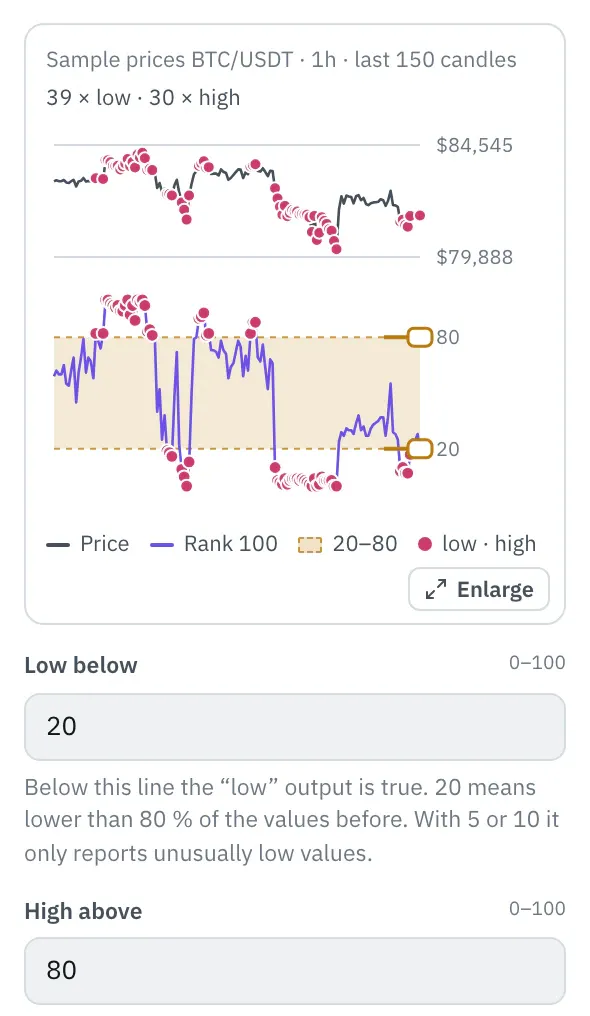
The properties show the price of the last 150 candles at the top and Percent rank below it, with the zone between the thresholds. Drag a threshold or type it; the number in the field follows in whole steps. Dots on the price show where “low” or “high” would be true, the top line shows how often.
More under Chart below the price.
Settings
Section titled “Settings”The settings appear on the right under “Properties” once you click the node on the board. Below each field you find the same explanation as here.
Candles
Section titled “Candles”How many candles before the value is compared with. On daily candles 365 is a year, on hourly candles 168 a week. More candles need more lead time.
Low below
Section titled “Low below”Below this line the “low” output is true. 20 means lower than 80 % of the values before. With 5 or 10 it only reports unusually low values.
High above
Section titled “High above”Above this line the “high” output is true. 80 means higher than 80 % of the values before. With 95 it only reports values that were rare there.
Example
Section titled “Example”With historical volatility in front: Telegram notifies you when the swings are lower than in 90 % of the hours of the past week.
How to connect the nodes:
- Candle (Price) → Historical volatility (Value)
- Historical volatility (HV) → Percent rank (Value)
- Percent rank (low) → Telegram (Trigger)
On the board it reads: 168 candles · below 10
Chain as JSON
To try it, copy it and paste it in the editor under “Import”. Importing creates a new chain.
{ "name": "Example: Percent rank", "version": 1, "nodes": [ { "id": "c1", "type": "core.candle", "position": { "x": 40, "y": 40 }, "settings": { "pair": "BTC/USDT", "timeframe": "1h" } }, { "id": "h1", "type": "core.hv", "position": { "x": 260, "y": 40 }, "settings": {} }, { "id": "p1", "type": "core.percent-rank", "position": { "x": 480, "y": 40 }, "settings": { "length": 168, "low": 10 } }, { "id": "t1", "type": "core.telegram", "position": { "x": 700, "y": 40 }, "settings": {} } ], "edges": [ { "from": "c1.close", "to": "h1.in" }, { "from": "h1.out", "to": "p1.in" }, { "from": "p1.low", "to": "t1.in" } ]}Inputs and outputs
Section titled “Inputs and outputs”Only matching types connect: number series to number series (round pin), signal to signal (square), message to message (diamond).
| Direction | Pin | Type | Note |
|---|---|---|---|
| Input | Value | Number series | required |
| Output | Rank | Number series | – |
| Output | low | Signal (true/false) | – |
| Output | high | Signal (true/false) | – |
Good to know
Section titled “Good to know”- In messages the value is called “Rank 100”.
- Warm-up with the default settings: 101 candles (this many extra candles are loaded by the replay before the value is reliable).
- Search also finds it under: percentile, percent rank, rank, statistics, yearly low, yearly high, normalize.
Technical details
Section titled “Technical details”Share of the values of the chosen candles before that are less than or equal to the current one, times 100; the current one does not count, empty values do not count. The same formula as ta.percentrank in TradingView.
- Type in the chain:
core.percent-rank· Version 1.0.0 · Category keyind - Settings in the chain:
length(Candles),low(Low below),high(High above) - Pins in the chain: Input
in· Outputout,low,high - Reference tests in the manifest: 2 (with fixed price data: 500 candles of 1h)
- How a node is built
Version 2026.10.24.21 · Changelog