API
With the API, your own programs control your chains and fetch your alerts: a bot, a dashboard or a script that writes the night’s alerts into a spreadsheet each morning. Unlike a webhook, which Bellchain calls on every alert, your program asks here by itself, so it needs no public address. The API comes with the Trader plan. The MCP server for AI assistants works through it as well.
Creating a key
Section titled “Creating a key”Under Settings, in the API card, pick the rights, give the new key a name such as “My bot” and click Create key:
- Read only (default): read the account, chains, alerts, templates and prices and run replays. Such a key never sees the secret settings of your chains. Good for dashboards and AI assistants.
- Read and change: also create, activate and pause chains. For bots and scripts that should switch things.
The key starts with bc_ and is shown only this once: copy it right away and keep it like a password. After that, the card only shows its rights, its last four characters and when it was last used. Keys from before 21 October 2026 may read and change, as before.
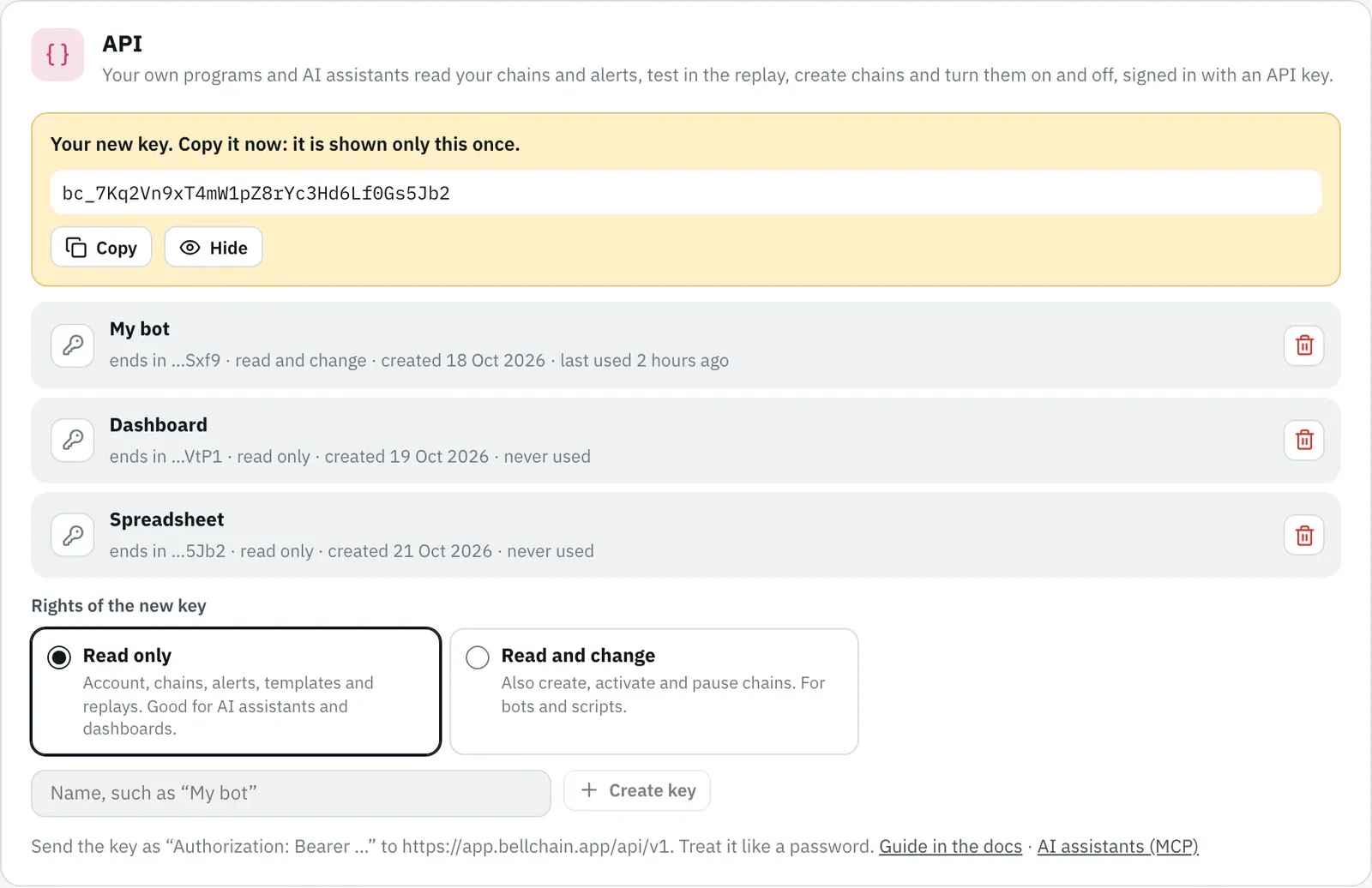
Up to five keys, ideally one per program. Revoke (trash can) blocks a key at once. When Trader ends, the API stops answering; you can still revoke your keys.
Authentication
Section titled “Authentication”Every request sends the key in the Authorization header:
curl -H "Authorization: Bearer bc_…" https://app.bellchain.app/api/v1/accountThe same endpoints are also available at https://api.bellchain.app/v1/…, such as https://api.bellchain.app/v1/account. Responses are JSON. Times are UTC in ISO 8601, such as 2026-10-20T08:00:00.000Z. Without a key or with a wrong one, the API answers 401; without Trader, 403; and a “Read only” key gets 403 with read_only_key when it tries to change something.
Endpoints
Section titled “Endpoints”| Method and path | Effect |
|---|---|
GET /api/v1/account |
plan, active chains and limit, replay period (replayDays), language, time zone and the rights of the key (access: read or full). Handy for checking a key. |
GET /api/v1/chains |
all chains with status (draft, active, paused), markets, revisions and lastAlertAt |
GET /api/v1/chains/{id} |
one chain plus its saved version in the chain format (definition), its nodes as sentences (summary) and its secrets (secrets) |
POST /api/v1/chains |
create a chain from a template with your own values or as a price alert, as a draft (read and change) |
POST /api/v1/chains/{id}/activate |
activate or take over saved changes, with the same checks as in the app (read and change) |
POST /api/v1/chains/{id}/pause |
pause (read and change) |
GET /api/v1/alerts |
alerts of the last 90 days, newest first |
GET /api/v1/alerts/{id} |
one alert with “Why?”: which conditions were true and which values went in |
GET /api/v1/templates |
the gallery’s templates with plan, market and the result of their test |
GET /api/v1/templates/{id} |
one template with every setting you can adjust (parameters) and tips |
POST /api/v1/replay |
how often a chain, a template with your values or a price alert would have fired |
GET /api/v1/markets/quote |
latest price of a pair (?pair=BTC/USDT) with high and low of the last 7 days |
Activating and pausing
Section titled “Activating and pausing”Without a body, activate takes the latest saved version; with {"revision": 3} only exactly that one, otherwise you get 409. If it does not work, say because the plan allows no further active chain, the API answers 422 and names the reasons:
{ "error": "not_activatable", "message": "…", "problems": [{ "code": "limit", "message": "…" }] }If the chosen exchange has no such pair, the code is pair, and message suggests matching pairs, as in the app. If the exchange is not delivering its pairs right now, the chain is activated anyway, with a note in warnings.
curl -X POST -H "Authorization: Bearer bc_…" https://app.bellchain.app/api/v1/chains/Xy12ab/activatecurl -X POST -H "Authorization: Bearer bc_…" https://app.bellchain.app/api/v1/chains/Xy12ab/pauseSecrets in chains
Section titled “Secrets in chains”Webhook, Discord, Slack, Teams and Google Chat addresses, tokens and trading bot codes are secrets: whoever knows them can send there. GET /api/v1/chains/{id} lists them under secrets (node, setting and name), but their values are in definition only with a “Read and change” key. With ?secrets=omit the API leaves them empty even then, like the export for sharing in the editor; secretsOmitted says whether they are missing. Secrets can only be set in the app, not through the API.
Templates and new chains
Section titled “Templates and new chains”GET /api/v1/templates/{id} lists every setting of the template under parameters, with node, value, range, options and explanation. From that, POST /api/v1/chains builds your own chain, like Use template in the app, in your account’s language:
{ "template": "dip", "name": "ETH Dip", "pair": "ETH/USDT", "timeframe": "1h", "settings": { "k1": { "value": 30 } }, "once": false}pairapplies to the candle of templates with one pair,timeframeto all candles. Scanners get their coins withpairs.settingssets single settings: node → setting → value. Every value is checked as in the editor.once: pause after the first alert.
Instead of template, priceAlert creates a price alert, like the dialog in the app:
{ "priceAlert": { "pair": "BTC/USDT", "kind": "below", "value": 60000, "channels": ["telegram"] } }kind is above, below, rise or fall (by value percent within window: 1m, 5m, 15m, 1h, 4h or 24h, default 24h). Without channels the alert goes to the first channel set up (Telegram, then push, then email). coins or top ({"count": 20, "quote": "USDT"}) turn rise and fall into a scanner.
The new chain is a draft (201, status: "draft") and runs only after activate, where your plan’s limits apply. The answer names under plan the smallest plan that can activate it, and under warnings, for example, a price level that has already been passed.
Replay
Section titled “Replay”POST /api/v1/replay calculates like Run replay in the editor and creates nothing. The chain comes from your account ({"chainId": "Xy12ab"}, its saved version) or is built like when creating, from template or priceAlert; days picks the period, default 90, at most replayDays.
{ "name": "BTC Dip Buyer", "days": 90, "source": "live", "market": { "exchange": "…", "pair": "ETH/USDT", "timeframe": "1h" }, "alerts": 7, "heldByCooldown": 2, "firstAlertAt": "2026-07-30T13:00:00.000Z", "lastAlertAt": "2026-10-17T09:00:00.000Z", "recent": [{ "time": "2026-10-17T09:00:00.000Z", "price": 2412.5, "message": "…" }]}recent lists the ten latest alerts. If the exchange cannot be reached, the replay uses stored sample prices; then it says "source": "fixtures" with a note in notice. A scanner counts per coin (coins).
Fetching alerts
Section titled “Fetching alerts”| Parameter | Meaning |
|---|---|
since |
only alerts from this candle close on (inclusive), ISO 8601 or milliseconds |
chain |
one or more chains, separated by commas |
limit |
1 to 100, default 50 |
cursor |
the next value of the previous response, for the next page |
{ "alerts": [ { "id": "Xy12ab.1792429200000", "chainId": "Xy12ab", "chainName": "BTC Dip Buyer", "time": "2026-10-18T17:00:00.000Z", "test": false, "pair": "BTC/USDT", "timeframe": "1h", "price": 77788, "quote": "USDT", "message": "BTC Dip Buyer: RSI below 30", "values": [{ "label": "RSI 14", "value": 27.69, "text": "27.69" }], "deliveries": [{ "channel": "telegram", "outcome": "sent" }, { "channel": "push", "outcome": "muted", "reason": "quiet_hours" }], "moves": [{ "afterMs": 3600000, "percent": 0.5 }, { "afterMs": 14400000, "percent": -1.2 }, { "afterMs": 86400000, "percent": null }] } ], "next": "…"}exchangenames the exchange from the chain’s candle, as the ID from its selection.deliveriessays per channel how it went:sent,failed,held,muted,pendingorlogged, with a reason as on the Alerts page, such asquiet_hoursduring your quiet hours.movesis the price move afterwards in percent, per time span in milliseconds;nullwhile the time is not up yet.- Alerts of a scanner carry
"scanner": true. Each coin is an alert of its own:pairnames it, andidends with it, such asXy12ab.1792429200000.ETH_USDT. The chain itself then has the fieldscannerwith the candle and the pairs, as in the chain format; with top N it hastopand, underpairs, today’s coins, andmarketslists their markets.
A program that picks up new alerts asks about once a minute with since set to the time of the last alert and skips alerts whose id it already knows.
GET /api/v1/alerts/{id} returns one alert with why, like Why? on the Alerts page: for each condition on the path to the action its sentence, whether it was true (state) and the values that went in (inputs). It is calculated with the version running today; consistent: false means the chain has changed since.
Limits
Section titled “Limits”- At most 120 requests per minute per key; above that you get
429withRetry-After: 60. Of these, at most 10 replays per minute and 30 new chains per hour. - Up to five keys per account.
- Alerts go back 90 days, as on the Alerts page.
- The API is meant for programs on your computer or server. It does not work from another site’s browser page (no CORS).
Errors
Section titled “Errors”| Status | error |
Meaning |
|---|---|---|
| 400 | bad_body, bad_since, bad_pair |
incomplete request, text in message |
| 401 | unauthorized |
key missing, wrong or revoked |
| 403 | plan_no_api |
without Trader |
| 403 | read_only_key |
the key may only read |
| 404 | not_found, template_not_found |
the chain, alert or template does not exist (anymore) |
| 409 | conflict |
the revision does not match; the current chain is in chain |
| 413 | too_large |
the body is larger than 64 KB |
| 422 | not_activatable |
activation not possible, reasons in problems |
| 422 | invalid_setting, unknown_node, unknown_setting, secret_setting, invalid_chain … |
a value for the new chain does not fit; with invalid_chain the check messages are in issues |
| 422 | no_channel, channel_not_ready |
the price alert’s channel is not set up yet |
| 429 | rate_limited |
too many requests |
| 503 | no_data, busy |
replay: no prices, or too many long replays right now |
message is a sentence for people in your account’s language; your program is best off deciding by status and error.
Version 2026.10.21.23 · Changelog