Band
- Value
- Line
Price enters VWAP ±0.2 %
- true/false
- Upper
- Lower
- Distance %
Value in a band of ±x % around a line. Places a band of ±x % around a line, such as yesterday’s POC, the VWAP or a pivot, and checks on every candle where the value stands: inside the band, outside, when entering or leaving, on a breakout up or down, or whether it swings around the line. The band moves with the line, even when it jumps every day. Example: price swings around prior day POC ±0.3 % with 3 crossings in 12 candles reports when BTC runs above and below yesterday’s most traded price three times in half a day without leaving the band.
What it looks like
Section titled “What it looks like”- Price (close of each candle)
- prior day POC (line)
- band ±0.4 %
- true as long as
- true on exactly one candle
Setting it in the chart
Section titled “Setting it in the chart”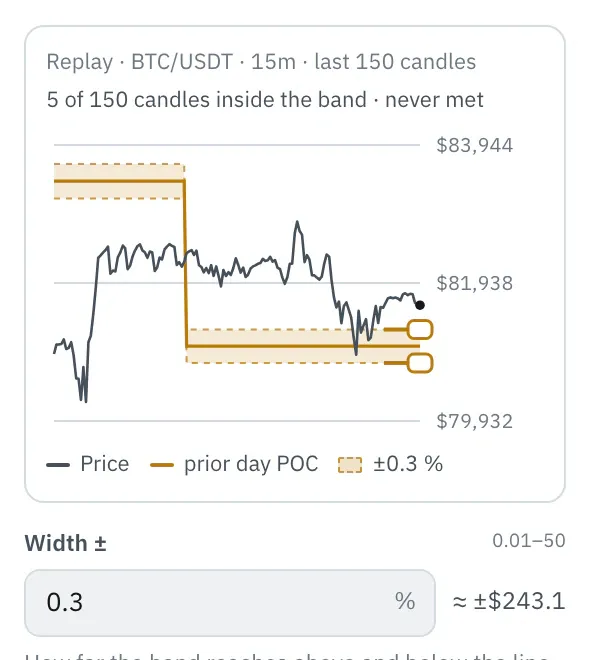
In the properties, a chart shows the last 150 candles with the line and the band. Drag an edge or type the width; next to it you see how far the band reaches in dollars at the last candle. The top line shows how many candles lie inside the band, dots mark where the condition would be met.
More under Chart above the price.
Settings
Section titled “Settings”The settings appear on the right under “Properties” once you click the node on the board. Below each field you find the same explanation as here.
Condition
Section titled “Condition”When the node is true: while the value lies inside or outside the band, at the moment of a change, or when it swings around the line.
- is inside the band: True while the value lies inside the band, both edges included.
- is outside the band: True while the value lies above or below the band.
- enters the band (default): Only true on the candle where the value comes into the band from outside, such as when the price returns to the POC after a move away.
- leaves the band: Only true on the candle where the value leaves the band, in either direction.
- breaks out upward: Only true on the candle where the value crosses above the upper edge of the band.
- breaks out downward: Only true on the candle where the value crosses below the lower edge of the band.
- swings around the line: True when the last candles (setting Candles) all close inside the band and the value crosses the line at least as often as set under Crossings. That is what a calm phase around the POC looks like, in which the market accepts the price before it picks a direction.
Width ±
Section titled “Width ±”How far the band reaches above and below the line, in percent of the line. 0.5 means 0.5 % above and below, so with a POC of $80,000 that is $400 in each direction. For POC and value area with hourly candles, 0.2 to 0.5 % fit.
Candles
Section titled “Candles”Only for “swings around the line”: for how many candles the value must stay inside the band. 12 hourly candles are half a day.
Crossings
Section titled “Crossings”Only for “swings around the line”: how many times the value must at least cross the line within these candles. 3 means three changes of side; more than candles − 1 is never met.
Example
Section titled “Example”The band sits ±0.2 % around the day’s VWAP. When the price returns there after a move away, Telegram notifies you. With the Volume profile node instead of the VWAP, the price swings around yesterday’s POC.
How to connect the nodes:
- Candle (Price) → VWAP (Price)
- Candle (High) → VWAP (High)
- Candle (Low) → VWAP (Low)
- Candle (Volume) → VWAP (Volume)
- Candle (Price) → Band (Value)
- VWAP (VWAP) → Band (Line)
- Band (true/false) → Telegram (Trigger)
On the board it reads: Price enters VWAP ±0.2 %
Chain as JSON
To try it, copy it and paste it in the editor under “Import”. Importing creates a new chain.
{ "name": "Example: Band", "version": 1, "nodes": [ { "id": "c1", "type": "core.candle", "position": { "x": 40, "y": 40 }, "settings": { "pair": "BTC/USDT", "timeframe": "1h" } }, { "id": "w1", "type": "core.vwap", "position": { "x": 260, "y": 40 }, "settings": {} }, { "id": "b1", "type": "core.band", "position": { "x": 480, "y": 40 }, "settings": { "mode": "enters", "width": 0.2 } }, { "id": "t1", "type": "core.telegram", "position": { "x": 700, "y": 40 }, "settings": {} } ], "edges": [ { "from": "c1.close", "to": "w1.close" }, { "from": "c1.high", "to": "w1.high" }, { "from": "c1.low", "to": "w1.low" }, { "from": "c1.volume", "to": "w1.volume" }, { "from": "c1.close", "to": "b1.in" }, { "from": "w1.out", "to": "b1.line" }, { "from": "b1.out", "to": "t1.in" } ]}Inputs and outputs
Section titled “Inputs and outputs”Only matching types connect: number series to number series (round pin), signal to signal (square), message to message (diamond).
| Direction | Pin | Type | Note |
|---|---|---|---|
| Input | Value | Number series | required |
| Input | Line | Number series | required |
| Output | true/false | Signal (true/false) | – |
| Output | Upper | Number series | in the unit of the input |
| Output | Lower | Number series | in the unit of the input |
| Output | Distance % | Number series | in percent |
Good to know
Section titled “Good to know”- In messages the values are called “upper band”, “lower band”, “distance to line”.
- Warm-up with the default settings: 1 candles (this many extra candles are loaded by the replay before the value is reliable).
- Search also finds it under: band, zone, distance, percent, oscillates, poc, rotation, near, around the line.
Technical details
Section titled “Technical details”Band: line ± width / 100 × |line|, the edges count as inside. Breakouts cross the edges by the same rule as “crosses” in Compare (like ta.crossover and ta.crossunder in TradingView). “swings around” is true when the last N closes lie inside the band and the value crosses the line at least K times between them (ta.cross over N − 1 candles). Distance: (value − line) / |line| × 100.
- Type in the chain:
core.band· Version 1.0.0 · Category keycond - Settings in the chain:
mode(Condition),width(Width ±),bars(Candles),crossings(Crossings) - Pins in the chain: Input
in,line· Outputout,upper,lower,distance - Reference tests in the manifest: 2 (with fixed price data: 500 candles of 1h)
- How a node is built
Version 2026.10.21.23 · Changelog