Round numbers
- Price
- High
- Low
Step 10,000
- above
- below
- crossed up
- crossed down
- near
Round levels above and below the price. Finds the round numbers above and below the price, such as $85,000 and $84,000 for BTC, and reports when the close crosses one of them. Many traders place orders at such levels, so the price often reacts there. You set the step to a fixed value such as 5,000, or leave it automatic: one power of ten below the size of the price. The “near” output reports when a candle comes within ±x % of the chosen level. Example: with step 10,000, “crossed up” reports every new ten-thousand level, such as “BTC above $100,000”.
What it looks like
Section titled “What it looks like”- Price (close of each candle)
- round number above
- round number below
- crossed up
Setting it in the chart
Section titled “Setting it in the chart”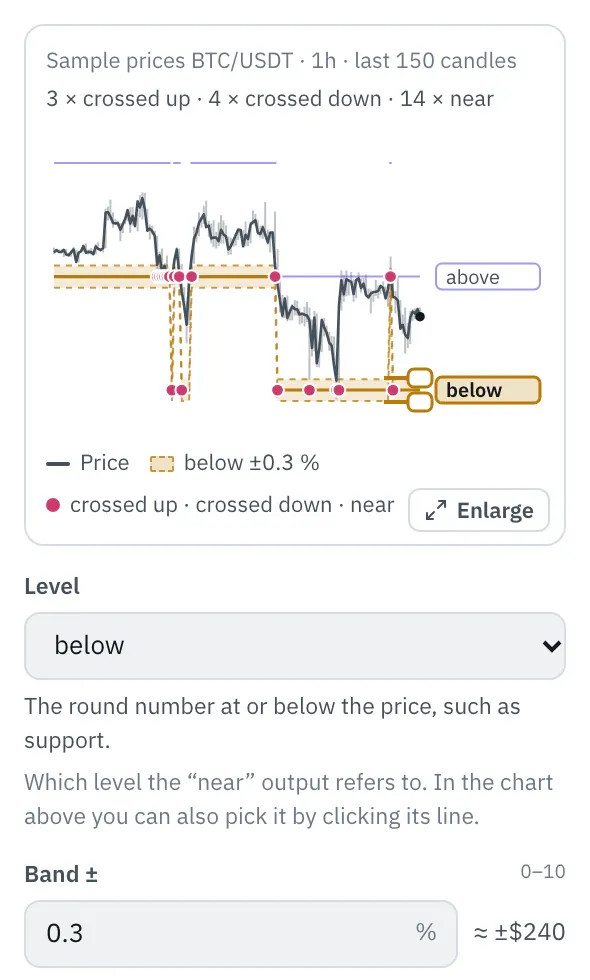
In the properties, a chart shows the levels over the last 150 candles, with their names on the right. Click a level or its name, or pick it with the arrow keys: the band ±x % for the “near” output lies around it. Drag an edge of the band or type the number under “Band ±”; dots mark the candles that came that close to the level. Levels far from the price sit at the edge with an arrow.
More under Chart above the price.
Settings
Section titled “Settings”The settings appear on the right under “Properties” once you click the node on the board. Below each field you find the same explanation as here.
Distance between the round numbers in price terms, such as 1,000 or 5,000 for BTC, 100 for ETH. 0 means automatic: one power of ten below the size of the price, so $1,000 at $84,000 and $0.01 at $0.25.
Which level the “near” output refers to. In the chart above you can also pick it by clicking its line.
- above (default): The next round number above the price, such as resistance.
- below: The round number at or below the price, such as support.
Band ±
Section titled “Band ±”How close a candle must come to the level, in percent of the level: “near” is true as soon as the candle’s high or low reaches into the band. 0.3 means 0.3 % above and below, so with a level of $80,000 that is $240. With 0 only a candle that touches the level itself counts.
Example
Section titled “Example”Notifies you of every new ten-thousand level BTC crosses from below, such as “BTC above $100,000”.
How to connect the nodes:
- Candle (Price) → Round numbers (Price)
- Candle (High) → Round numbers (High)
- Candle (Low) → Round numbers (Low)
- Round numbers (crossed up) → Telegram (Trigger)
On the board it reads: Step 10,000
Chain as JSON
To try it, copy it and paste it in the editor under “Import”. Importing creates a new chain.
{ "name": "Example: Round numbers", "version": 1, "nodes": [ { "id": "c1", "type": "core.candle", "position": { "x": 40, "y": 40 }, "settings": { "pair": "BTC/USDT", "timeframe": "1h" } }, { "id": "r1", "type": "core.round-numbers", "position": { "x": 260, "y": 40 }, "settings": { "step": 10000 } }, { "id": "t1", "type": "core.telegram", "position": { "x": 480, "y": 40 }, "settings": {} } ], "edges": [ { "from": "c1.close", "to": "r1.close" }, { "from": "c1.high", "to": "r1.high" }, { "from": "c1.low", "to": "r1.low" }, { "from": "r1.crossUp", "to": "t1.in" } ]}Inputs and outputs
Section titled “Inputs and outputs”Only matching types connect: number series to number series (round pin), signal to signal (square), message to message (diamond).
| Direction | Pin | Type | Note |
|---|---|---|---|
| Input | Price | Number series | required |
| Input | High | Number series | required |
| Input | Low | Number series | required |
| Output | above | Number series | appears in messages as a price, e.g. “$81,616” |
| Output | below | Number series | appears in messages as a price, e.g. “$81,616” |
| Output | crossed up | Signal (true/false) | – |
| Output | crossed down | Signal (true/false) | – |
| Output | near | Signal (true/false) | – |
Good to know
Section titled “Good to know”- In messages the values are called “Round number above”, “Round number below”.
- Warm-up with the default settings: 1 candles (this many extra candles are loaded by the replay before the value is reliable).
- Search also finds it under: round numbers, round number, psychological level, big figure, level, milestone, whole number.
Technical details
Section titled “Technical details”Below = ⌊close / step⌋ · step, above one step more. Automatic step: 10 to the power (⌊log₁₀ close⌋ − 1). Crossed up when ⌊close / step⌋ is larger than for the previous close (with the step of the current candle), crossed down when smaller; a close exactly on the level counts as above. “near”: low ≤ level · (1 + x / 100) and high ≥ level · (1 − x / 100).
- Type in the chain:
core.round-numbers· Version 1.0.0 · Category keyind - Settings in the chain:
step(Step),level(Level),width(Band ±) - Pins in the chain: Input
close,high,low· Outputabove,below,crossUp,crossDown,near - Reference tests in the manifest: 2 (with fixed price data: 500 candles of 1h)
- How a node is built
Version 2026.10.24.21 · Changelog