Premium/discount
- Price
- High
- Low
equilibrium ±5 % · 10 · 10
- In discount
- In premium
- At equilibrium
- Position %
- Range high
- Range low
- Equilibrium
Where the price sits in the swing range. Splits the range between the last swing high and the last swing low: in the upper half the price is expensive (premium), in the lower half cheap (discount), around the middle at equilibrium. Many traders prefer to buy in discount and sell in premium. If the price rises above the swing high, the range grows with it; a new swing sets it anew. The node reports which zone the price closes in and gives its position in percent. Example: “in discount” with AND in front of a bullish order block lets only returns in the cheap half through.
What it looks like
Section titled “What it looks like”- Premium
- Equilibrium
- Discount
- in discount
Setting it in the chart
Section titled “Setting it in the chart”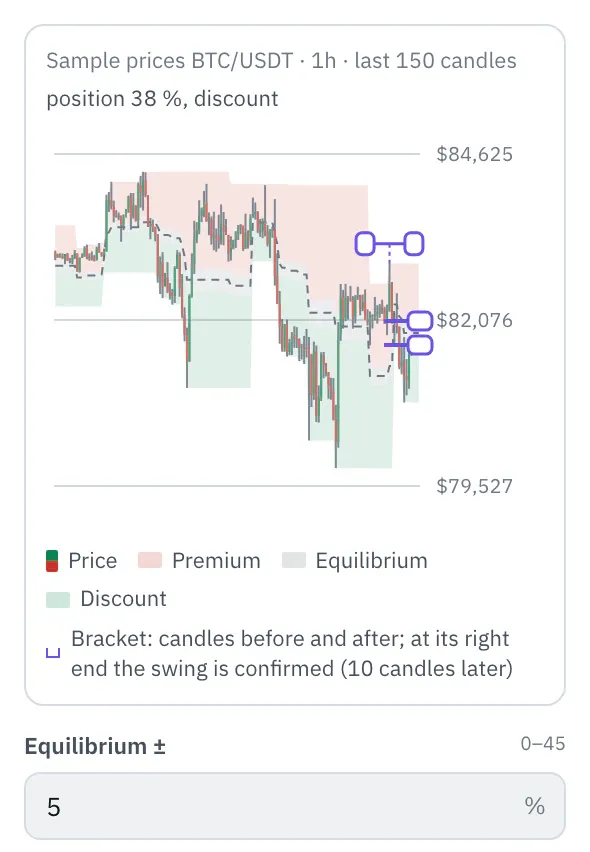
In the properties, a chart shows the last 150 candles and on top of them what the node finds with your settings; dotted or dashed is what it did not know yet at that time. Drag the edges of the equilibrium at the right edge. Drag the ends of the bracket at the latest swing to change “Candles before” and “Candles after”; at its right end the swing is confirmed. The top line shows the state at the last candle, and the chart follows every setting right away.
More under Smart money and Chart above the price.
Settings
Section titled “Settings”The settings appear on the right under “Properties” once you click the node on the board. Below each field you find the same explanation as here.
Equilibrium ±
Section titled “Equilibrium ±”How wide the equilibrium around the middle is, in percent of the range. 5 means 45 to 55 %: below is discount, above is premium. With 0 the middle splits the range exactly, with 25 only the lower and upper quarter count.
Candles before
Section titled “Candles before”How many candles before a high must all be lower, before a low higher. With more candles only clearer turning points count.
Candles after
Section titled “Candles after”How many candles after a high must not rise above it before it counts as a swing. Only then does it count here, that many candles later; with fewer candles it counts sooner, but smaller turning points count too.
Example
Section titled “Example”RSI below 30, but only when the price also sits in the discount of the last swing range, its cheap half.
How to connect the nodes:
- Candle (Price) → Premium/discount (Price)
- Candle (High) → Premium/discount (High)
- Candle (Low) → Premium/discount (Low)
- Candle (Price) → RSI (Value)
- RSI (RSI) → Compare (Value)
- Compare (true/false) → AND (Signal 1)
- Premium/discount (In discount) → AND (Signal 2)
- AND (all true) → Telegram (Trigger)
On the board it reads: equilibrium ±5 % · 10 · 10
Chain as JSON
To try it, copy it and paste it in the editor under “Import”. Importing creates a new chain.
{ "name": "Example: Premium/discount", "version": 1, "nodes": [ { "id": "c1", "type": "core.candle", "position": { "x": 40, "y": 40 }, "settings": { "pair": "BTC/USDT", "timeframe": "1h" } }, { "id": "d1", "type": "core.premium-discount", "position": { "x": 260, "y": 40 }, "settings": {} }, { "id": "r1", "type": "core.rsi", "position": { "x": 260, "y": 170 }, "settings": { "length": 14 } }, { "id": "k1", "type": "core.compare", "position": { "x": 480, "y": 40 }, "settings": { "operator": "below", "value": 30 } }, { "id": "a1", "type": "core.and", "position": { "x": 700, "y": 40 }, "settings": {} }, { "id": "t1", "type": "core.telegram", "position": { "x": 920, "y": 40 }, "settings": {} } ], "edges": [ { "from": "c1.close", "to": "d1.close" }, { "from": "c1.high", "to": "d1.high" }, { "from": "c1.low", "to": "d1.low" }, { "from": "c1.close", "to": "r1.in" }, { "from": "r1.out", "to": "k1.in" }, { "from": "k1.out", "to": "a1.in0" }, { "from": "d1.discount", "to": "a1.in1" }, { "from": "a1.out", "to": "t1.in" } ]}Inputs and outputs
Section titled “Inputs and outputs”Only matching types connect: number series to number series (round pin), signal to signal (square), message to message (diamond).
| Direction | Pin | Type | Note |
|---|---|---|---|
| Input | Price | Number series | required |
| Input | High | Number series | required |
| Input | Low | Number series | required |
| Output | In discount | Signal (true/false) | – |
| Output | In premium | Signal (true/false) | – |
| Output | At equilibrium | Signal (true/false) | – |
| Output | Position % | Number series | in percent |
| Output | Range high | Number series | appears in messages as a price, e.g. “$81,616” |
| Output | Range low | Number series | appears in messages as a price, e.g. “$81,616” |
| Output | Equilibrium | Number series | appears in messages as a price, e.g. “$81,616” |
Good to know
Section titled “Good to know”- In messages the values are called “position in range 10 · 10”, “range high 10 · 10”, “range low 10 · 10”, “equilibrium 10 · 10”.
- Warm-up with the default settings: 520 candles (this many extra candles are loaded by the replay before the value is reliable).
- Search also finds it under: premium, discount, equilibrium, range, dealing range, cheap, expensive, ote, smart money, smc.
Technical details
Section titled “Technical details”High: highest high since the last confirmed swing high, low: lowest low since the last confirmed swing low, each at most 500 candles back. Position = (close − low) / (high − low) × 100. Discount: position below 50 − equilibrium, premium: above 50 + equilibrium, otherwise equilibrium.
- Type in the chain:
core.premium-discount· Version 1.0.0 · Category keyind - Settings in the chain:
band(Equilibrium ±),left(Candles before),right(Candles after) - Pins in the chain: Input
close,high,low· Outputdiscount,premium,equilibrium,position,top,bottom,middle - Reference tests in the manifest: 1 (with fixed price data: 500 candles of 1h)
- How a node is built
Version 2026.10.21.23 · Changelog