Scanner
A scanner is a chain that runs for many coins at once. Instead of building “RSI below 25 → Telegram” nine times for BTC, ETH, SOL and the others, you build the chain once and give the candle a list of coins, or you let Bellchain pick the most traded ones every day: top N by volume. Bellchain runs the chain for each coin separately: each has its own RSI, its own cooldown and its own alerts. Scanners come with Pro; you can test them in the replay on any plan.
How to create a scanner
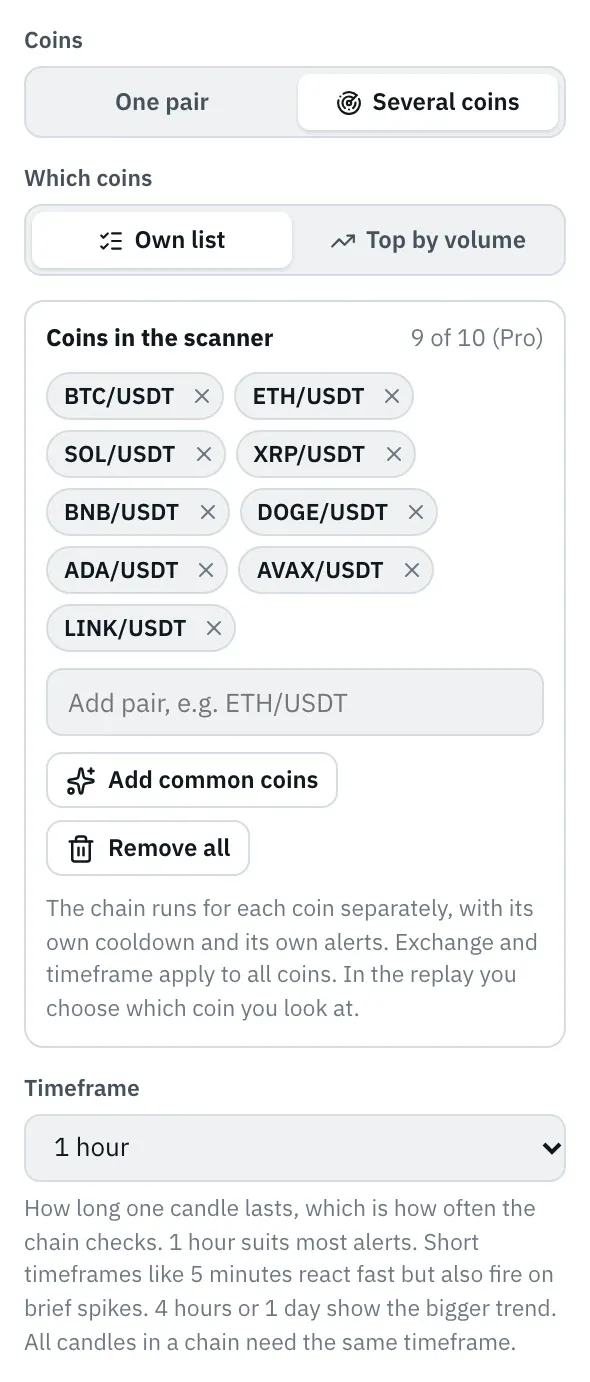
Section titled “How to create a scanner”- Select the candle in the editor. Under Properties, Coins offers the choice One pair or Several coins.
- Choose Several coins. The coins take the place of the trading pair. Under Which coins you choose Own list or Top by volume; your own list starts with the candle’s pair.
- Add coins: in the field Add pair you search just like for the trading pair, and a click on a pair adds it to the list. Add common coins fills the list with the common coins against the same quote currency, up to your plan’s limit. The × on a coin takes it out, Remove all empties the list. With Top by volume you choose how many coins and against which quote currency instead.
- Check in the replay how often the coins fire, then Activate.
The candle’s exchange and timeframe apply to all coins. Pairs that this exchange doesn’t list are marked in red. On the board the candle reads “Scanner · 9 coins · 1h” or “Scanner · Top 25 USDT · 1h”, and under My chains the chain carries the badge Scanner · 9 coins or Scanner · Top 25 USDT.
It’s quicker with the templates or, for moves in percent, with the price alert.
Top N by volume
Section titled “Top N by volume”Instead of a list of your own, the scanner takes the N coins with the highest turnover of the last 24 hours against a quote currency, on the candle’s exchange. That way “RSI below 25” always runs over the coins that are being traded right now, without you maintaining the list.
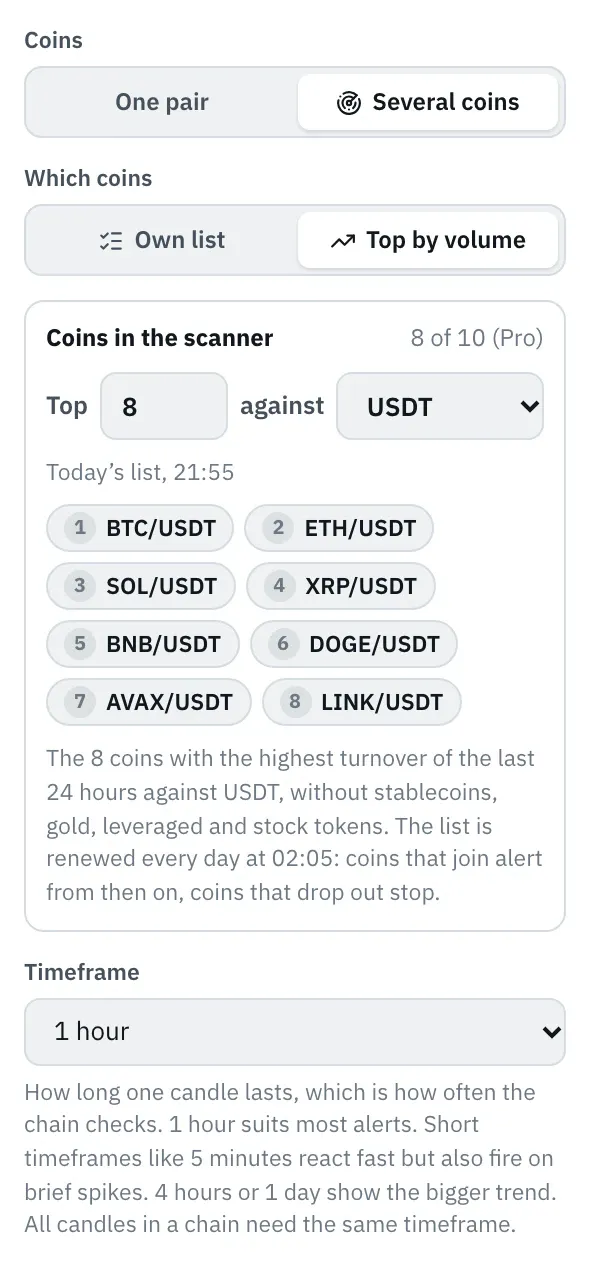
- In the candle choose Several coins and then Top by volume.
- Enter the number of coins, 1 to 100, preset to your plan’s limit, and choose the quote currency, such as USDT or EUR.
- Below it you see today’s list with each coin’s rank. It can’t be edited; if you want particular coins, use your own list.
- Turnover means the amount traded in the quote currency, so in USDT for USDT pairs. The volume in units of a coin isn’t comparable across coins.
- Not in the list are stablecoins and currencies (USDC, EUR …), gold-backed tokens, leveraged tokens and tokenized stocks and ETFs, as far as the exchange makes them recognizable. They often have the highest turnover but say nothing for crypto alerts.
- Renewed every day: the list is renewed every day at 00:05 UTC. A coin that joins alerts from then on; it doesn’t send alerts for candles before the change. A coin that drops out stops. Coins that stay keep running without a break, with their cooldown.
- Against the limit counts the number N, even if the exchange has fewer matching pairs on a given day. Top 25 therefore needs room for 25 coins.
- If the exchange has no pairs against the chosen quote currency, the scanner can’t be activated. If the exchange can’t be reached at 00:05, the previous day’s list stays in force.
How the scanner calculates
Section titled “How the scanner calculates”- Each coin runs like a chain of its own: its own indicators, its own state in nodes such as Then or Confirmation, its own cooldown. If ETH fires, SOL can still fire a minute later.
- Only the candle with the list switches coins. Other candles in the chain stay as they are. A filter like “only while BTC is above the EMA 200” keeps applying to all coins.
- In messages
{{coin}}names the coin, such as “ETH”, and{{pair}}the pair, such as “ETH/USDT”. The other placeholders work as usual for the coin that fired. - Pause after the first alert pauses the whole scanner as soon as the first coin fires.
- As with any chain, checks run at the close of each candle, for all coins at once.
Notifications
Section titled “Notifications”Each coin fires its own alert. The title names the coin, such as “RSI Scanner Across 9 Coins · ETH/USDT”.
If several coins fire at the same candle, Bellchain bundles them: Telegram, push, email, Pushover, ntfy, Discord, Slack, Teams and Google Chat get one message with all coins of that candle, one line per coin with its values. The message names up to 20 coins, with Pushover and Discord as many as fit into one message; the rest are under Alerts. Webhooks and trading bots get a request of their own for each coin.
24.6 · Price: $31.08
ETH/USDT RSI 14: 23.4 · Price: $3,984
SOL/USDT RSI 14: 21.8 · Price: $187.4
1h · Oct 17, 8:00 AMBelow the bundled message in Telegram, Acknowledge all acknowledges the coins of that candle, Mute for 4 h mutes the whole scanner, and View alerts opens the Alerts page filtered to this scanner.
For the daily limits each coin counts as one alert, even when several arrive in one message.
Alerts
Section titled “Alerts”Under Alerts each coin has its own row with pair, values and price curve. Acknowledging and “Why?” apply to that coin, and Open in editor and Replay from here open the replay with the alert’s coin. If three or more coins fire in quick succession, the list groups them as a burst as usual. The Chain filter shows all coins of a scanner, the Pair filter one coin across all chains.
Testing in the replay
Section titled “Testing in the replay”The replay runs a scanner the way it would run live, coin by coin.
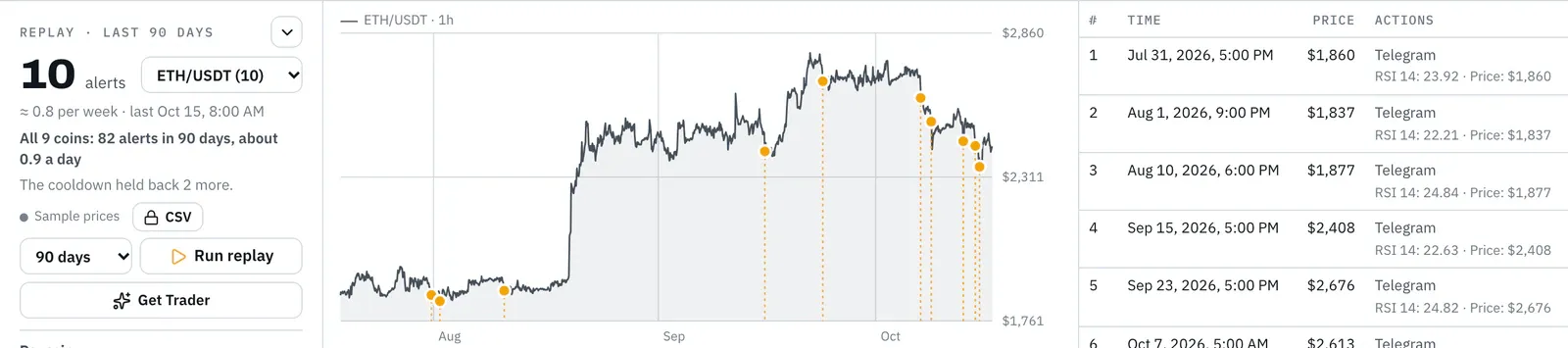
- Next to the number of alerts you choose which coin the chart and the list show. The number counts that coin.
- After the replay Bellchain counts how often each coin would have fired: the line below gives the total of all coins, such as “All 9 coins: 82 alerts in 90 days”. In the selection each coin shows its number of alerts, and further down in the left column the list Per coin has them too; a click on a coin shows it in the chart.
- With many coins on a small timeframe, Bellchain counts over a shorter period so the result arrives quickly. The line names it.
- With top N the replay uses today’s list, also for earlier days. A coin that has only recently been traded this much wouldn’t have been in the list back then; the line below the total reminds you of that.
Price alert for several coins
Section titled “Price alert for several coins”The price alert offers Several coins for rises by and falls by, with a list of your own or as Top by volume, such as “Top 50 USDT rises by 5 % within 1 h”. The dialog then creates a scanner: each coin fires on its own, with its own cooldown, and if half the market moves at once, one message lists them all. The preview at the bottom counts how often the coins together would have fired in the last days and names the most frequent one.
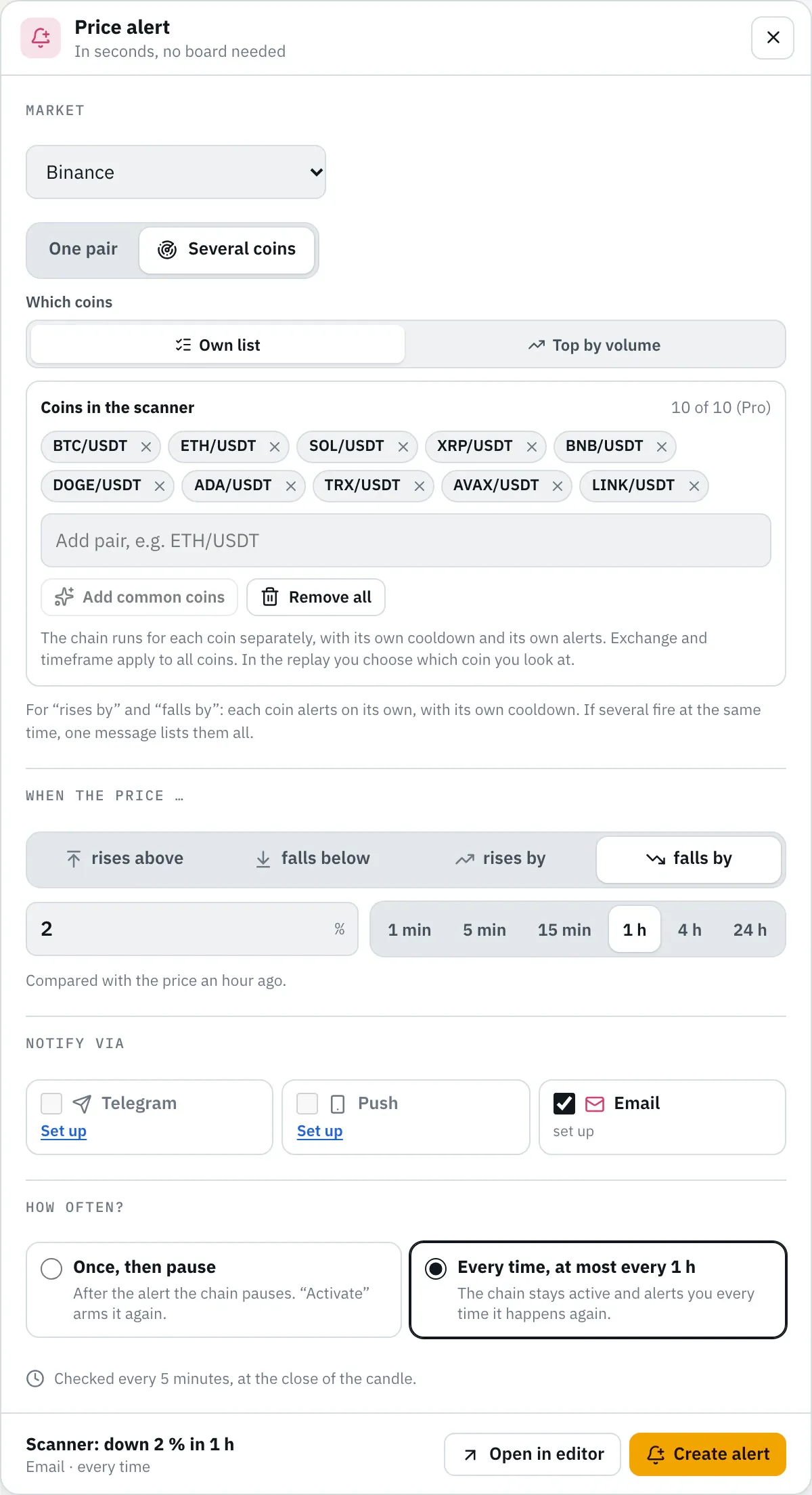
Levels such as rises above and falls below are only available for one pair, because a level belongs to the price of one coin.
Templates
Section titled “Templates”Three templates run as scanners over 9 common coins on 1-hour candles:
- RSI Scanner Across 9 Coins: RSI below 25, at most every 12 hours per coin.
- Big Moves Across 9 Coins: more than 4 % within an hour, up or down.
- Volume Breakouts Across 9 Coins: the 50-candle high broken, on more than three times the volume.
In the gallery you find them under the topic Scanner.
Plan limits
Section titled “Plan limits”| Free | Pro | Trader | Community | |
|---|---|---|---|---|
| Coins in all active scanners together | – | 10 | 50 | 100 |
- The limit applies to all active scanners of your account together. On Pro that is, for example, one scanner with 10 coins or two with 5 each. On Trader, for example, top 30 and a list of your own with 20 coins fit.
- A scanner also counts as one active chain.
- A list holds at most 100 coins, top N at most top 100.
- You can test any list in the replay, even above the limit and on Free. When you activate, Bellchain tells you what’s missing: pause another scanner, take coins off the list or choose a bigger plan.
- When a plan ends, scanners that no longer fit pause with the note “paused · plan limit”, just like other chains. See When a plan ends.
Version 2026.10.21.23 · Changelog