Rolling profile
- High
- Low
- Volume
100 candles
- POC
- VAH
- VAL
- High
- Low
- near
Volume profile of the last candles. A volume profile over the last candles instead of a calendar day: POC, value area, high and low of the last 100 candles, anew on every candle. That gives a profile even in the middle of a session, matching the chain’s timeframe, with no jump at midnight. By default the candle that just closed does not count; that way a close can lie above the value area without moving it itself. The “near” output reports when a candle comes within ±x % of a chosen level. Example: “Price crosses above 100-candle VAH” reports when ETH breaks out of the range in which 70 % of the volume of the last 100 hours was traded.
What it looks like
Section titled “What it looks like”- Price (close of each candle)
- 100-candle POC
- 100-candle VAH and VAL
- price crosses above VAH
Setting it in the chart
Section titled “Setting it in the chart”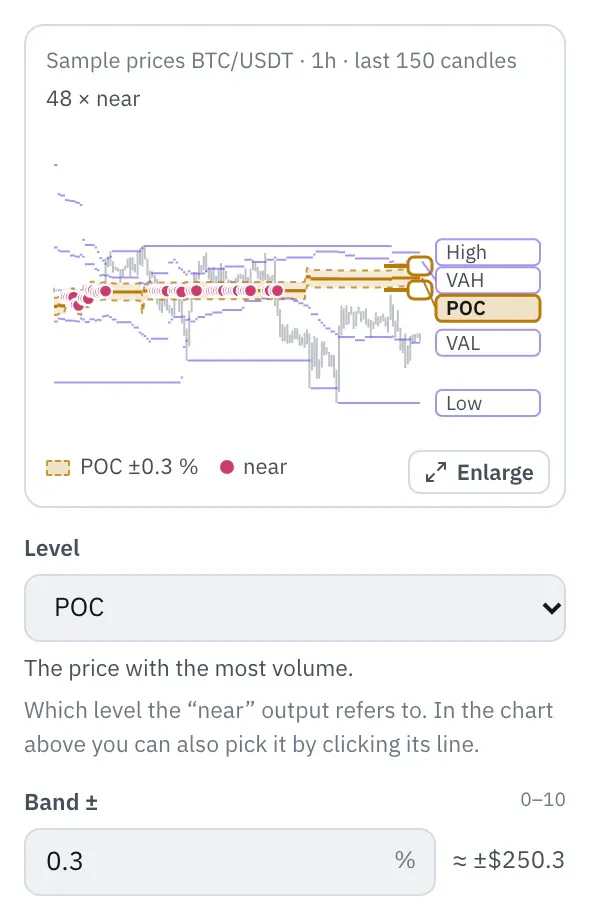
In the properties, a chart shows the levels over the last 150 candles, with their names on the right. Click a level or its name, or pick it with the arrow keys: the band ±x % for the “near” output lies around it. Drag an edge of the band or type the number under “Band ±”; dots mark the candles that came that close to the level. Levels far from the price sit at the edge with an arrow.
More under Chart above the price.
Settings
Section titled “Settings”The settings appear on the right under “Properties” once you click the node on the board. Below each field you find the same explanation as here.
Candles
Section titled “Candles”How many candles the profile spans. 100 hourly candles are a little over four days, 100 15-minute candles one day.
Current candle
Section titled “Current candle”Whether the candle that just closed counts towards the profile. For breakout alerts leave it out, otherwise the candle moves the levels it breaks.
- exclude (default): The profile of the candles before. Right for breakouts.
- include: The profile including the current candle.
Value area
Section titled “Value area”Which share of the volume lies inside the value area. 70 % is usual; more makes it wider, less tighter around the POC.
Price levels
Section titled “Price levels”How many levels of equal height the session’s range is split into. With 50, one level is 0.05 % high at a 2.5 % daily range; more levels rarely add accuracy because the candles themselves are coarse.
Which level the “near” output refers to. In the chart above you can also pick it by clicking its line.
- High: The highest high of the candles in the window.
- VAH: The upper edge of the value area.
- POC (default): The price with the most volume.
- VAL: The lower edge of the value area.
- Low: The lowest low of the candles in the window.
Band ±
Section titled “Band ±”How close a candle must come to the level, in percent of the level: “near” is true as soon as the candle’s high or low reaches into the band. 0.3 means 0.3 % above and below, so with a level of $80,000 that is $240. With 0 only a candle that touches the level itself counts.
Example
Section titled “Example”Notifies you when the price breaks out above the value area of the last 100 hours, the range in which 70 % of the volume was traded.
How to connect the nodes:
- Candle (High) → Rolling profile (High)
- Candle (Low) → Rolling profile (Low)
- Candle (Volume) → Rolling profile (Volume)
- Candle (Price) → Compare A/B (A)
- Rolling profile (VAH) → Compare A/B (B)
- Compare A/B (true/false) → Telegram (Trigger)
On the board it reads: 100 candles
Chain as JSON
To try it, copy it and paste it in the editor under “Import”. Importing creates a new chain.
{ "name": "Example: Rolling profile", "version": 1, "nodes": [ { "id": "c1", "type": "core.candle", "position": { "x": 40, "y": 40 }, "settings": { "pair": "BTC/USDT", "timeframe": "1h" } }, { "id": "r1", "type": "core.rolling-profile", "position": { "x": 260, "y": 40 }, "settings": {} }, { "id": "k1", "type": "core.compare-ab", "position": { "x": 480, "y": 40 }, "settings": { "operator": "crossesAbove" } }, { "id": "t1", "type": "core.telegram", "position": { "x": 700, "y": 40 }, "settings": {} } ], "edges": [ { "from": "c1.high", "to": "r1.high" }, { "from": "c1.low", "to": "r1.low" }, { "from": "c1.volume", "to": "r1.volume" }, { "from": "c1.close", "to": "k1.a" }, { "from": "r1.vah", "to": "k1.b" }, { "from": "k1.out", "to": "t1.in" } ]}Inputs and outputs
Section titled “Inputs and outputs”Only matching types connect: number series to number series (round pin), signal to signal (square), message to message (diamond).
| Direction | Pin | Type | Note |
|---|---|---|---|
| Input | High | Number series | required |
| Input | Low | Number series | required |
| Input | Volume | Number series | required |
| Output | POC | Number series | appears in messages as a price, e.g. “$81,616” |
| Output | VAH | Number series | appears in messages as a price, e.g. “$81,616” |
| Output | VAL | Number series | appears in messages as a price, e.g. “$81,616” |
| Output | High | Number series | appears in messages as a price, e.g. “$81,616” |
| Output | Low | Number series | appears in messages as a price, e.g. “$81,616” |
| Output | near | Signal (true/false) | – |
Good to know
Section titled “Good to know”- In messages the values are called “100-candle POC”, “100-candle VAH”, “100-candle VAL”, “100-candle high”, “100-candle low”.
- Warm-up with the default settings: 101 candles (this many extra candles are loaded by the replay before the value is reliable).
- Search also finds it under: rolling profile, volume profile, last candles, poc, value area, vah, val, window, rolling, periodic.
Technical details
Section titled “Technical details”Profile as in the Volume profile node, but over a window of “Candles” candles ending at the candle before (with “include” at the current one); computed from scratch on every candle so that no value depends on where the data begins. Empty until the window is full. “near”: low ≤ level × (1 + x / 100) and high ≥ level × (1 − x / 100).
- Type in the chain:
core.rolling-profile· Version 1.0.0 · Category keyind - Settings in the chain:
length(Candles),current(Current candle),valueArea(Value area),rows(Price levels),level(Level),width(Band ±) - Pins in the chain: Input
high,low,volume· Outputpoc,vah,val,high,low,near - Reference tests in the manifest: 1 (with fixed price data: 500 candles of 1h)
- How a node is built
Version 2026.10.25.16 · Changelog