Volume profile
- High
- Low
- Volume
previous day
- POC
- VAH
- VAL
- High
- Low
- near
POC and value area of the prior session. Shows at which prices most trading happened in a session. The POC is the price with the most volume, the value area the range around it holding 70 % of the volume, VAH and VAL are its upper and lower edge. Many traders see the value area as the previous day’s fair price: the price often returns there or rotates around the POC, and a close outside it counts as a sign of a trend. The “near” output reports when a candle comes within ±x % of a chosen level. Example: “near POC ±0.3 %” reports when BTC gets within 0.3 % of yesterday’s most traded price; with the Band node, “Price rotates around prior day POC ±0.3 %” reports when it swings around that price. Bellchain builds the profile from the chain’s candles, most accurately with 15-minute or 1-hour candles.
What it looks like
Section titled “What it looks like”- Price (close of each candle)
- volume profile of the day, value area stronger
- prior day POC
- prior day VAH and VAL
Setting it in the chart
Section titled “Setting it in the chart”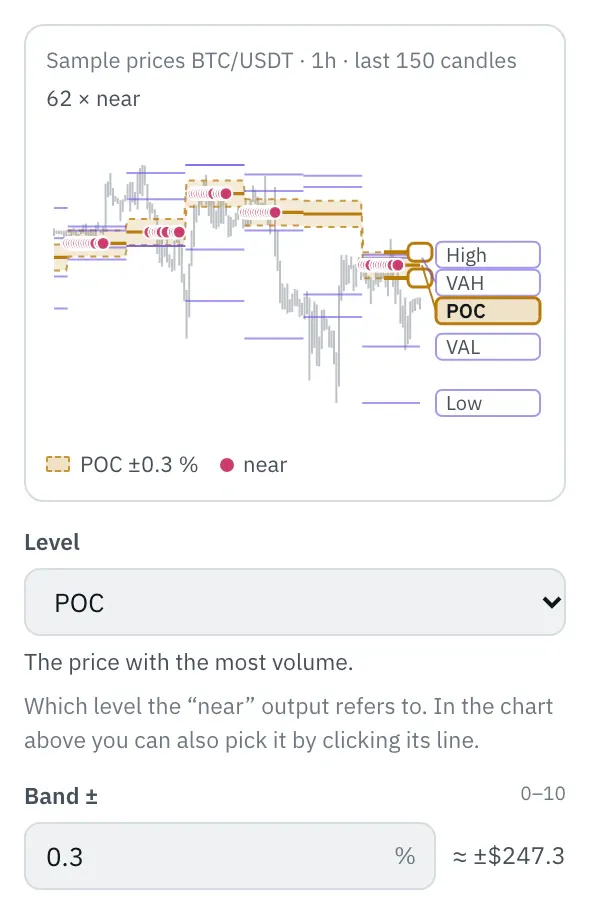
In the properties, a chart shows the levels over the last 150 candles, with their names on the right. Click a level or its name, or pick it with the arrow keys: the band ±x % for the “near” output lies around it. Drag an edge of the band or type the number under “Band ±”; dots mark the candles that came that close to the level. Levels far from the price sit at the edge with an arrow.
More under Chart above the price.
Settings
Section titled “Settings”The settings appear on the right under “Properties” once you click the node on the board. Below each field you find the same explanation as here.
Session
Section titled “Session”Whether the profile of a completed session applies or that of the current session so far.
- previous (default): The profile of the last completed session, such as yesterday. It is fixed from the first candle of the new session and does not change until it ends.
- current: The profile of the current session up to the candle that just closed. POC and value area move along; on the last candle they are exactly the profile that counts as the previous one from the next session on.
Period
Section titled “Period”How long a session is: one day, one week from Monday or one calendar month.
- day (default): One session per calendar day. Most accurate with candles from 15 minutes to 1 hour.
- week: One session per calendar week, Monday to Sunday. Suits 1-hour and 4-hour candles.
- month: One session per calendar month. Suits 4-hour and daily candles.
Value area
Section titled “Value area”Which share of the volume lies inside the value area. 70 % is usual; more makes it wider, less tighter around the POC.
Price levels
Section titled “Price levels”How many levels of equal height the session’s range is split into. With 50, one level is 0.05 % high at a 2.5 % daily range; more levels rarely add accuracy because the candles themselves are coarse.
Time zone
Section titled “Time zone”The time zone in which the day, week and month begin. The default is UTC, like the exchanges’ daily candles; in Berlin that is 1:00 AM in winter and 2:00 AM in summer. With Europe/Berlin the day begins at midnight German time.
Which level the “near” output refers to. In the chart above you can also pick it by clicking its line.
- High: The highest price of the session.
- VAH: The upper edge of the value area.
- POC (default): The price with the most volume.
- VAL: The lower edge of the value area.
- Low: The lowest price of the session.
Band ±
Section titled “Band ±”How close a candle must come to the level, in percent of the level: “near” is true as soon as the candle’s high or low reaches into the band. 0.3 means 0.3 % above and below, so with a level of $80,000 that is $240. With 0 only a candle that touches the level itself counts.
Example
Section titled “Example”The volume profile provides yesterday’s POC, the band places ±0.3 % around it. When the price swings around the POC inside the band for half a day, Telegram notifies you.
How to connect the nodes:
- Candle (High) → Volume profile (High)
- Candle (Low) → Volume profile (Low)
- Candle (Volume) → Volume profile (Volume)
- Candle (Price) → Band (Value)
- Volume profile (POC) → Band (Line)
- Band (true/false) → Telegram (Trigger)
On the board it reads: previous day
Chain as JSON
To try it, copy it and paste it in the editor under “Import”. Importing creates a new chain.
{ "name": "Example: Volume profile", "version": 1, "nodes": [ { "id": "c1", "type": "core.candle", "position": { "x": 40, "y": 40 }, "settings": { "pair": "BTC/USDT", "timeframe": "1h" } }, { "id": "v1", "type": "core.volume-profile", "position": { "x": 260, "y": 40 }, "settings": {} }, { "id": "b1", "type": "core.band", "position": { "x": 480, "y": 40 }, "settings": { "mode": "oscillates", "width": 0.3 } }, { "id": "t1", "type": "core.telegram", "position": { "x": 700, "y": 40 }, "settings": {} } ], "edges": [ { "from": "c1.high", "to": "v1.high" }, { "from": "c1.low", "to": "v1.low" }, { "from": "c1.volume", "to": "v1.volume" }, { "from": "c1.close", "to": "b1.in" }, { "from": "v1.poc", "to": "b1.line" }, { "from": "b1.out", "to": "t1.in" } ]}Inputs and outputs
Section titled “Inputs and outputs”Only matching types connect: number series to number series (round pin), signal to signal (square), message to message (diamond).
| Direction | Pin | Type | Note |
|---|---|---|---|
| Input | High | Number series | required |
| Input | Low | Number series | required |
| Input | Volume | Number series | required |
| Output | POC | Number series | appears in messages as a price, e.g. “$81,616” |
| Output | VAH | Number series | appears in messages as a price, e.g. “$81,616” |
| Output | VAL | Number series | appears in messages as a price, e.g. “$81,616” |
| Output | High | Number series | appears in messages as a price, e.g. “$81,616” |
| Output | Low | Number series | appears in messages as a price, e.g. “$81,616” |
| Output | near | Signal (true/false) | – |
Good to know
Section titled “Good to know”- In messages the values are called “prior day POC”, “prior day VAH”, “prior day VAL”, “prior day high”, “prior day low”.
- Warm-up with the default settings: 48 candles (this many extra candles are loaded by the replay before the value is reliable).
- Search also finds it under: volume profile, poc, vah, val, value area, market profile, vpoc, point of control, prior day.
Technical details
Section titled “Technical details”Price levels of equal height across the session’s range; each candle’s volume is spread evenly over its range, in proportion to its overlap with each level. The POC is the middle of the level with the most volume, on a tie the one closer to the middle of the range. The value area grows from the POC level by level towards the neighbouring level with more volume, on a tie the closer one, then the upper one, until it holds the set share; VAH is its top edge, VAL its bottom edge. The same value area rule as TradingView’s volume profiles, which however compute from candles of a smaller timeframe. “near”: low ≤ level × (1 + x / 100) and high ≥ level × (1 − x / 100).
- Type in the chain:
core.volume-profile· Version 1.0.0 · Category keyind - Settings in the chain:
session(Session),period(Period),valueArea(Value area),rows(Price levels),timezone(Time zone),level(Level),width(Band ±) - Pins in the chain: Input
high,low,volume· Outputpoc,vah,val,high,low,near - Reference tests in the manifest: 2 (with fixed price data: 500 candles of 1h)
- How a node is built
Version 2026.10.21.23 · Changelog