S/R zones
- Price
- High
- Low
0.5 % · 3+ swings · 300 candles
- Breakout above zone
- Breakdown below zone
- Close in zone
- Support top
- Support bottom
- Resistance top
- Resistance bottom
Support and resistance from swings. Finds price zones where the price turned several times: if several swing highs and lows sit close together, they form a zone, and the more swings, the stronger it is. Zones below the price are support, zones above resistance. The node reports when the price breaks out above or below a zone or closes inside one, and gives the nearest support and resistance. The zones form anew on every candle from the confirmed swings. Example: “breakout above zone” reports when SOL closes above a zone where it turned at least three times.
What it looks like
Section titled “What it looks like”- Support, number of swings
- Resistance
- Swing in a zone
Setting it in the chart
Section titled “Setting it in the chart”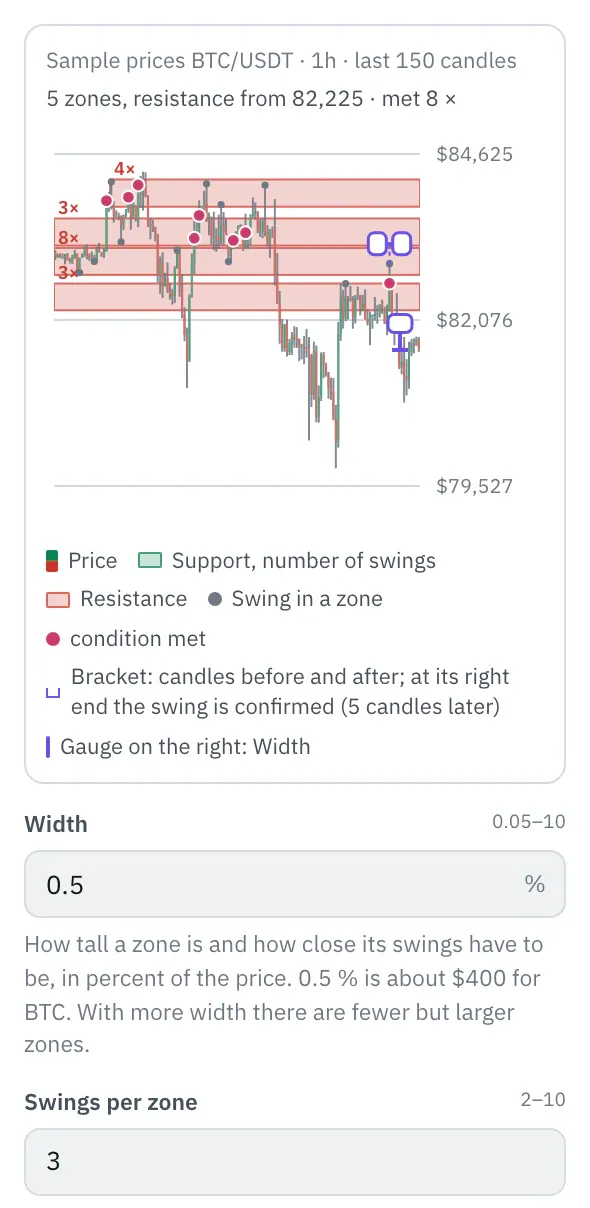
In the properties, a chart shows the last 150 candles and on top of them what the node finds with your settings; dotted or dashed is what it did not know yet at that time. The gauge at the right edge shows “Width”; drag it vertically. Drag the ends of the bracket at the latest swing to change “Candles before” and “Candles after”; at its right end the swing is confirmed. The top line shows the state at the last candle, and the chart follows every setting right away.
More under Smart money and Chart above the price.
Settings
Section titled “Settings”The settings appear on the right under “Properties” once you click the node on the board. Below each field you find the same explanation as here.
How tall a zone is and how close its swings have to be, in percent of the price. 0.5 % is about $400 for BTC. With more width there are fewer but larger zones.
Swings per zone
Section titled “Swings per zone”How many swings a zone needs at least. With 2 there are many zones, with 3 or more only those where the price turned more often.
Lookback
Section titled “Lookback”How many candles the swings come from. 300 hourly candles are 12.5 days; older turning points no longer count.
Candles before
Section titled “Candles before”How many candles before a high must all be lower, before a low higher. With more candles only clearer turning points count.
Candles after
Section titled “Candles after”How many candles after a high must not rise above it before it counts as a swing. Only then does it count here, that many candles later; with fewer candles it counts sooner, but smaller turning points count too.
Example
Section titled “Example”Notifies you when the price closes above a zone where it turned at least three times.
How to connect the nodes:
- Candle (Price) → S/R zones (Price)
- Candle (High) → S/R zones (High)
- Candle (Low) → S/R zones (Low)
- S/R zones (Breakout above zone) → Telegram (Trigger)
On the board it reads: 0.5 % · 3+ swings · 300 candles
Chain as JSON
To try it, copy it and paste it in the editor under “Import”. Importing creates a new chain.
{ "name": "Example: S/R zones", "version": 1, "nodes": [ { "id": "c1", "type": "core.candle", "position": { "x": 40, "y": 40 }, "settings": { "pair": "BTC/USDT", "timeframe": "1h" } }, { "id": "z1", "type": "core.sr-zones", "position": { "x": 260, "y": 40 }, "settings": {} }, { "id": "t1", "type": "core.telegram", "position": { "x": 480, "y": 40 }, "settings": {} } ], "edges": [ { "from": "c1.close", "to": "z1.close" }, { "from": "c1.high", "to": "z1.high" }, { "from": "c1.low", "to": "z1.low" }, { "from": "z1.breakUp", "to": "t1.in" } ]}Inputs and outputs
Section titled “Inputs and outputs”Only matching types connect: number series to number series (round pin), signal to signal (square), message to message (diamond).
| Direction | Pin | Type | Note |
|---|---|---|---|
| Input | Price | Number series | required |
| Input | High | Number series | required |
| Input | Low | Number series | required |
| Output | Breakout above zone | Signal (true/false) | – |
| Output | Breakdown below zone | Signal (true/false) | – |
| Output | Close in zone | Signal (true/false) | – |
| Output | Support top | Number series | appears in messages as a price, e.g. “$81,616” |
| Output | Support bottom | Number series | appears in messages as a price, e.g. “$81,616” |
| Output | Resistance top | Number series | appears in messages as a price, e.g. “$81,616” |
| Output | Resistance bottom | Number series | appears in messages as a price, e.g. “$81,616” |
Good to know
Section titled “Good to know”- In messages the values are called “support top 0.5 %”, “support bottom 0.5 %”, “resistance top 0.5 %”, “resistance bottom 0.5 %”.
- Warm-up with the default settings: 311 candles (this many extra candles are loaded by the replay before the value is reliable).
- Search also finds it under: support, resistance, zone, level, breakout, swing, smart money, smc.
Technical details
Section titled “Technical details”Swings as in the Swing points node whose high or low is at most “Lookback” candles back. Swings whose values are at most “Width” percent apart form a zone: first the one with the most swings (if equal, the one with the latest swing, then the lower one), then from the rest the next one without overlap, as long as a zone has at least “Swings per zone”. Each zone is “Width” percent tall around the middle of its swings. Support: the nearest zone whose middle is not above the close, resistance the nearest above. Breakout: a close above a zone of the previous candle when the previous close was not above it.
- Type in the chain:
core.sr-zones· Version 1.0.0 · Category keyind - Settings in the chain:
width(Width),touches(Swings per zone),lookback(Lookback),left(Candles before),right(Candles after) - Pins in the chain: Input
close,high,low· OutputbreakUp,breakDown,inZone,supportHigh,supportLow,resistanceHigh,resistanceLow - Reference tests in the manifest: 1 (with fixed price data: 500 candles of 1h)
- How a node is built
Version 2026.10.21.23 · Changelog