VWAP
- Price
- High
- Low
- Volume
since start of day
- VWAP
- Upper
- Lower
Volume-weighted average price of the day. The average price since the start of the day, weighted by volume: candles with a lot of trading count more. Many large traders measure their buys against it. When the price is above the VWAP, the day’s buyers are in profit on average, below it at a loss. The bands show the usual spread around the VWAP. Example: “Price crosses above VWAP” fires when BTC rises back above the day’s average price. The node leaves the first period empty if not all of its candles are loaded.
What it looks like
Section titled “What it looks like”- Price (close of each candle)
- VWAP
- bands (width 1)
- price crosses above VWAP
Setting it in the chart
Section titled “Setting it in the chart”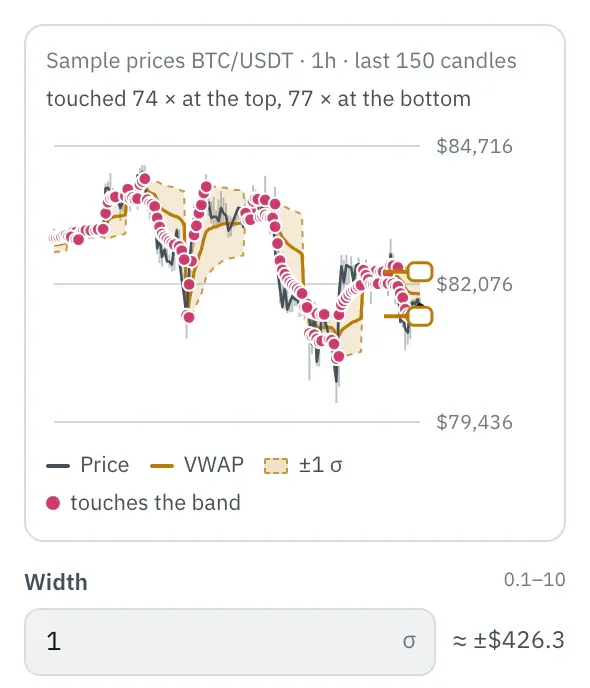
In the properties, a chart shows the last 150 candles with the middle and the band, computed with your settings. Drag an edge to change the width in standard deviations (σ), or type it; next to it you see how far the band reaches in dollars at the last candle. Dots mark where a candle’s high or low touches the band, the top line shows how often.
More under Chart above the price.
Settings
Section titled “Settings”The settings appear on the right under “Properties” once you click the node on the board. Below each field you find the same explanation as here.
When the VWAP starts over. Until then, every candle since the last reset counts.
- day (default): Starts over every day at midnight. The usual choice for candles up to 1 hour.
- week: Starts over every Monday and runs all week. Suits 4-hour candles.
- month: Starts over on the first of every month. Suits candles from 4 hours up.
Time zone
Section titled “Time zone”The time zone in which the day, week and month begin. The default is UTC, like the exchanges’ daily candles; in Berlin that is 1:00 AM in winter and 2:00 AM in summer. With Europe/Berlin the day begins at midnight German time.
How far the bands sit from the VWAP, measured in standard deviations. With 1 they are close to the VWAP, with 2 or 3 the price only reaches them on strong moves.
Example
Section titled “Example”Notifies you when the price rises back above the day’s average price.
How to connect the nodes:
- Candle (Price) → VWAP (Price)
- Candle (High) → VWAP (High)
- Candle (Low) → VWAP (Low)
- Candle (Volume) → VWAP (Volume)
- Candle (Price) → Compare A/B (A)
- VWAP (VWAP) → Compare A/B (B)
- Compare A/B (true/false) → Push (Trigger)
On the board it reads: since start of day
Chain as JSON
To try it, copy it and paste it in the editor under “Import”. Importing creates a new chain.
{ "name": "Example: VWAP", "version": 1, "nodes": [ { "id": "c1", "type": "core.candle", "position": { "x": 40, "y": 40 }, "settings": { "pair": "BTC/USDT", "timeframe": "1h" } }, { "id": "w1", "type": "core.vwap", "position": { "x": 260, "y": 40 }, "settings": {} }, { "id": "k1", "type": "core.compare-ab", "position": { "x": 480, "y": 40 }, "settings": { "operator": "crossesAbove" } }, { "id": "p1", "type": "core.push", "position": { "x": 700, "y": 40 }, "settings": {} } ], "edges": [ { "from": "c1.close", "to": "w1.close" }, { "from": "c1.high", "to": "w1.high" }, { "from": "c1.low", "to": "w1.low" }, { "from": "c1.volume", "to": "w1.volume" }, { "from": "c1.close", "to": "k1.a" }, { "from": "w1.out", "to": "k1.b" }, { "from": "k1.out", "to": "p1.in" } ]}Inputs and outputs
Section titled “Inputs and outputs”Only matching types connect: number series to number series (round pin), signal to signal (square), message to message (diamond).
| Direction | Pin | Type | Note |
|---|---|---|---|
| Input | Price | Number series | required |
| Input | High | Number series | required |
| Input | Low | Number series | required |
| Input | Volume | Number series | required |
| Output | VWAP | Number series | appears in messages as a price, e.g. “$81,616” |
| Output | Upper | Number series | appears in messages as a price, e.g. “$81,616” |
| Output | Lower | Number series | appears in messages as a price, e.g. “$81,616” |
Good to know
Section titled “Good to know”- In messages the values are called “VWAP”, “upper VWAP band”, “lower VWAP band”.
- Warm-up with the default settings: 48 candles (this many extra candles are loaded by the replay before the value is reliable).
- Search also finds it under: vwap, average price, volume, anchor, intraday, band.
Technical details
Section titled “Technical details”Sum of (high + low + close) / 3 × volume divided by the sum of volume since the start of the period, bands at width × the volume-weighted standard deviation; the same values as TradingView’s built-in VWAP indicator with standard deviation bands, from the first complete period on.
- Type in the chain:
core.vwap· Version 1.0.0 · Category keyind - Settings in the chain:
anchor(Reset),timezone(Time zone),mult(Width) - Pins in the chain: Input
close,high,low,volume· Outputout,upper,lower - Reference tests in the manifest: 1 (with fixed price data: 500 candles of 1h)
- How a node is built
Version 2026.10.21.23 · Changelog