Value area position
- High
- Low
- Volume
yesterday vs. the day before
- higher
- overlapping higher
- outside
- inside
- overlapping lower
- lower
- POC shift
Value area against the session before. Compares the value area of a session, the range holding 70 % of the volume, with the session before. Entirely above means the fair price has risen and buyers are in charge; entirely below the opposite. Overlapping higher or lower means value is slowly moving that way. Inside means the market is resting within the earlier range, often before a breakout; outside means the range has grown and both sides were active. The POC shift gives how far the most traded price has moved. Example: “higher” with “previous vs. the one before” reports in the morning when yesterday’s value area lay entirely above the one from the day before.
What it looks like
Section titled “What it looks like”- Value area higher than the one before, pale: overlapping higher
- lower, pale: overlapping lower
- outside, pale: inside
- Position the node reports from the next session on
Setting it in the chart
Section titled “Setting it in the chart”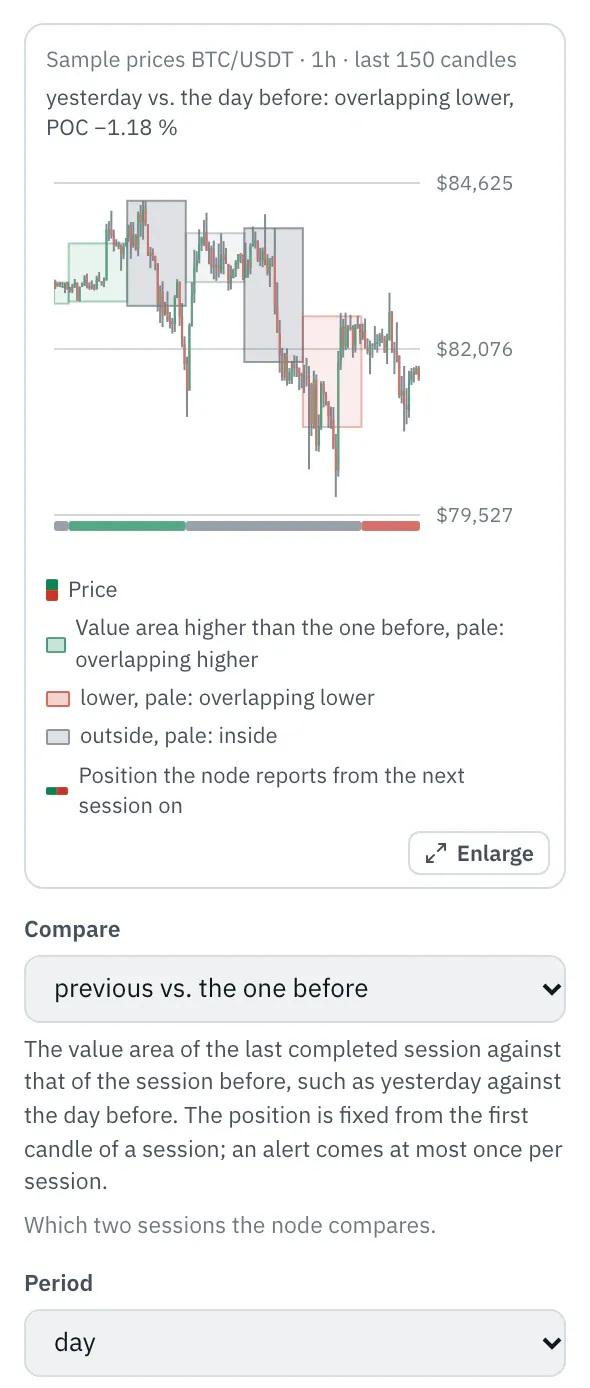
In the properties, a chart shows the last 150 candles with each day’s value area as a box, green higher than the day before, red lower, grey inside or outside; the strip below shows the position the node reports. With “current vs. previous” the current day’s value area grows as an area between yesterday’s VAH and VAL. The top line shows the position at the last candle, and the chart follows every setting right away.
More under Chart above the price.
Settings
Section titled “Settings”The settings appear on the right under “Properties” once you click the node on the board. Below each field you find the same explanation as here.
Compare
Section titled “Compare”Which two sessions the node compares.
- previous vs. the one before (default): The value area of the last completed session against that of the session before, such as yesterday against the day before. The position is fixed from the first candle of a session; an alert comes at most once per session.
- current vs. previous: The value area of the current session so far against that of the previous one, such as today against yesterday. Early in the session it is still narrow and often changes position; towards the end it shows where value is migrating.
Period
Section titled “Period”How long a session is: one day, one week from Monday or one calendar month.
- day (default): One session per calendar day. Most accurate with candles from 15 minutes to 1 hour.
- week: One session per calendar week, Monday to Sunday. Suits 1-hour and 4-hour candles.
- month: One session per calendar month. Suits 4-hour and daily candles.
Value area
Section titled “Value area”Which share of the volume lies inside the value area. 70 % is usual; more makes it wider, less tighter around the POC.
Price levels
Section titled “Price levels”How many levels of equal height the session’s range is split into. With 50, one level is 0.05 % high at a 2.5 % daily range; more levels rarely add accuracy because the candles themselves are coarse.
Time zone
Section titled “Time zone”The time zone in which the day, week and month begin. The default is UTC, like the exchanges’ daily candles; in Berlin that is 1:00 AM in winter and 2:00 AM in summer. With Europe/Berlin the day begins at midnight German time.
Example
Section titled “Example”Notifies you in the morning when yesterday’s value area lay entirely above the one from the day before: the fair price has risen.
How to connect the nodes:
- Candle (High) → Value area position (High)
- Candle (Low) → Value area position (Low)
- Candle (Volume) → Value area position (Volume)
- Value area position (higher) → Telegram (Trigger)
On the board it reads: yesterday vs. the day before
Chain as JSON
To try it, copy it and paste it in the editor under “Import”. Importing creates a new chain.
{ "name": "Example: Value area position", "version": 1, "nodes": [ { "id": "c1", "type": "core.candle", "position": { "x": 40, "y": 40 }, "settings": { "pair": "BTC/USDT", "timeframe": "1h" } }, { "id": "v1", "type": "core.value-area", "position": { "x": 260, "y": 40 }, "settings": {} }, { "id": "t1", "type": "core.telegram", "position": { "x": 480, "y": 40 }, "settings": {} } ], "edges": [ { "from": "c1.high", "to": "v1.high" }, { "from": "c1.low", "to": "v1.low" }, { "from": "c1.volume", "to": "v1.volume" }, { "from": "v1.higher", "to": "t1.in" } ]}Inputs and outputs
Section titled “Inputs and outputs”Only matching types connect: number series to number series (round pin), signal to signal (square), message to message (diamond).
| Direction | Pin | Type | Note |
|---|---|---|---|
| Input | High | Number series | required |
| Input | Low | Number series | required |
| Input | Volume | Number series | required |
| Output | higher | Signal (true/false) | – |
| Output | overlapping higher | Signal (true/false) | – |
| Output | outside | Signal (true/false) | – |
| Output | inside | Signal (true/false) | – |
| Output | overlapping lower | Signal (true/false) | – |
| Output | lower | Signal (true/false) | – |
| Output | POC shift | Number series | in percent |
Good to know
Section titled “Good to know”- In messages the value is called “POC shift”.
- Warm-up with the default settings: 72 candles (this many extra candles are loaded by the replay before the value is reliable).
- Search also finds it under: value area, relationship, higher value, lower value, inside value, outside value, overlapping, market profile, poc, migration, prior day.
Technical details
Section titled “Technical details”Value area as in the Volume profile node. With A the compared session and B the one before: higher when VAL(A) is above VAH(B); lower when VAH(A) is below VAL(B); inside when VAH(A) ≤ VAH(B) and VAL(A) ≥ VAL(B); outside when A encloses value area B and is larger; otherwise overlapping higher (VAH(A) above VAH(B)) or lower. Exactly one position is true as long as both sessions lie completely within the data. POC shift = (POC(A) − POC(B)) / POC(B) × 100.
- Type in the chain:
core.value-area· Version 1.0.0 · Category keyind - Settings in the chain:
compare(Compare),period(Period),valueArea(Value area),rows(Price levels),timezone(Time zone) - Pins in the chain: Input
high,low,volume· Outputhigher,overlapHigher,outside,inside,overlapLower,lower,shift - Reference tests in the manifest: 1 (with fixed price data: 500 candles of 1h)
- How a node is built
Version 2026.10.25.16 · Changelog